





Introduction to Maps Driving Directions
In today's fast-paced world, having a reliable navigation app is essential for both daily commutes and long-distance travels. Maps Driving Directions is a mobile application designed to provide users with accurate and efficient driving directions. Whether you're navigating through a bustling city or exploring remote areas, this app promises to be your trusted companion on the road.
Key Features of Maps Driving Directions
Maps Driving Directions comes packed with a variety of features that make it stand out from other navigation apps. One of its most notable features is its real-time traffic updates. The app continuously monitors traffic conditions and suggests alternative routes to help you avoid congestion and reach your destination faster.
Another standout feature is its offline mode. Unlike many other navigation apps that require a constant internet connection, Maps Driving Directions allows you to download maps for offline use. This is particularly useful when traveling through areas with poor or no internet connectivity.
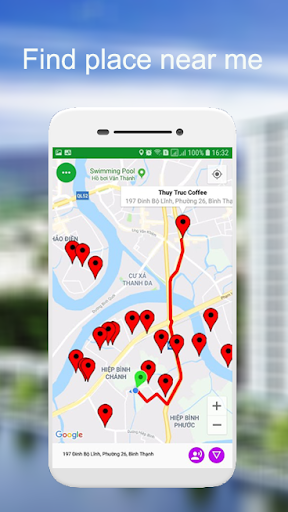
The app also offers voice-guided navigation, which ensures that you can keep your eyes on the road while receiving turn-by-turn directions. Additionally, it provides detailed information about points of interest, such as gas stations, restaurants, and hotels, making it easier for you to plan your journey.
User-Friendly Interface
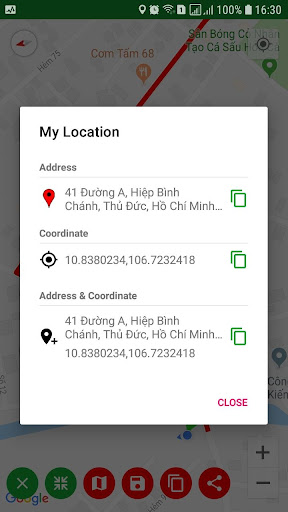
One of the first things you'll notice when using Maps Driving Directions is its intuitive and user-friendly interface. The app is designed to be easy to navigate, even for those who are not tech-savvy. The main screen displays a clear map with your current location, and the search bar at the top allows you to quickly enter your destination.
The app also offers customizable settings, allowing you to adjust the map view, choose between different route options, and set preferences for avoiding tolls or highways. These features make it easy to tailor the app to your specific needs and preferences.
Accuracy and Reliability
Accuracy is a critical factor when it comes to navigation apps, and Maps Driving Directions does not disappoint. The app uses advanced algorithms and data from multiple sources to provide precise directions and real-time updates. Users have reported that the app consistently delivers accurate ETAs and reliable route suggestions, even in complex urban environments.
Moreover, the app's offline maps are highly detailed and include up-to-date information about roads, landmarks, and points of interest. This ensures that you can rely on the app even when you're in areas with limited internet access.
Performance and Speed
Maps Driving Directions is optimized for performance, ensuring that it runs smoothly on a wide range of devices. The app loads quickly, and the maps render without any lag, providing a seamless user experience. Whether you're using it on a high-end smartphone or an older device, you can expect consistent performance and fast response times.
The app's ability to quickly recalculate routes in response to changing traffic conditions is another testament to its speed and efficiency. This feature is particularly valuable in dynamic driving environments where delays and detours are common.
Pros and Cons
Like any app, Maps Driving Directions has its strengths and weaknesses. On the positive side, the app offers a comprehensive set of features, including real-time traffic updates, offline maps, and voice-guided navigation. Its user-friendly interface and customizable settings make it accessible to a wide range of users.
However, some users have noted that the app's offline maps can take up a significant amount of storage space on their devices. Additionally, while the app is generally reliable, there have been occasional reports of minor inaccuracies in route suggestions.
Conclusion
Overall, Maps Driving Directions is a robust and reliable navigation app that offers a wide range of features to enhance your driving experience. Its real-time traffic updates, offline mode, and user-friendly interface make it a valuable tool for both everyday commuters and long-distance travelers. While it may have a few minor drawbacks, its strengths far outweigh its weaknesses, making it a top choice for anyone in need of a dependable navigation app.
If you're looking for an app that combines accuracy, reliability, and ease of use, Maps Driving Directions is definitely worth considering. Download it today and experience the convenience of having a trusted navigation companion at your fingertips.


