




Introduction: Redefining Note-Taking with AI Precision
In a fast-paced world where meetings, lectures, and interviews generate a constant stream of spoken information, capturing every detail accurately can feel like a challenge. Enter Otter, a mobile app that transforms voice into actionable text with remarkable efficiency. Unlike traditional note-taking tools that rely on manual typing or basic voice transcription, Otter leverages advanced artificial intelligence to deliver real-time, searchable, and shareable notes. This review explores why Otter stands out as a must-have tool for professionals, students, and anyone seeking to streamline their productivity.
Core Features: Real-Time Transcription and Intelligent Organization
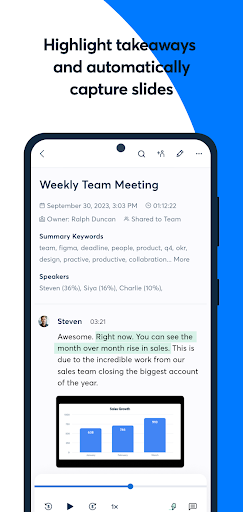
Otter’s standout capability is its ability to transcribe speech into text instantly during live conversations. The app listens and generates a synchronized transcript, allowing users to focus on the discussion rather than frantic note-taking. What sets Otter apart is its speaker identification: it automatically distinguishes between different voices, labeling them as “Speaker 1, Speaker 2,” and so forth. This feature is invaluable in group settings, such as team meetings or panel discussions, where attributing comments to the right person saves hours of guesswork. Additionally, Otter integrates with calendars (Google Calendar, Microsoft Outlook) to automatically join and transcribe scheduled online meetings via Zoom, Microsoft Teams, and Google Meet, ensuring no detail slips through the cracks.
Collaboration and Sharing: From Solo Notes to Team Workflows
Otter transforms note-taking into a collaborative experience. Users can share transcripts with colleagues or classmates, who can then highlight key points, add comments, or assign action items directly within the app. This is particularly powerful for remote teams: instead of sending static PDFs or emails, Otter provides a living document that updates in real-time. The app also generates “Otter Assistant” which can summarize meetings, extracting action items and key decisions. For example, after a sales call, Otter can produce a concise bullet-point summary, enabling quick follow-ups without re-listening to entire recordings. This blend of transcription and collaboration makes Otter a hub for team productivity, not just a passive recording tool.
User Experience: Seamless, Smart, and Searchable
Otter’s interface prioritizes simplicity without sacrificing depth. The mobile app is intuitive: opening the app reveals a dashboard of recent recordings, each searchable by keyword. Users can tap into any transcript to see highlighted terms, play back audio synced to text, or even export to formats like PDF, SRT (for subtitles), or plain text. A game-changer is Otter’s “search” function: it uses AI to index all spoken words, so searching for “budget approval” instantly pulls up the exact moment in a two-hour meeting where that phrase was mentioned. For multilingual users, Otter supports transcription in English (with Spanish and other languages in beta), but its strength lies in handling diverse accents and technical jargon—a relief for niche industries. Offline recording is also available, syncing later when connectivity is restored.
Value Proposition: Free vs. Premium Tiers
Otter offers compelling free and paid options. The free tier includes up to 300 minutes of transcription per month, with a 30-minute limit per session—adequate for students or light users. The Pro plan ($8.33/month) removes session limits, expands monthly minutes to 1,200, and adds advanced features like searchable transcripts across all recordings and mobile voice commands. For teams, the Business plan ($20/user/month) unlocks shared workspaces, custom vocabulary, and enhanced admin controls. Given that competitors like Rev or Temi charge per minute (often $0.10–$0.25), Otter’s subscription model delivers exceptional value, especially for heavy users. The free tier alone rivals premium tools, making it a low-risk entry point for new adopters.
Competitive Edge: What Makes Otter Unique
Compared to rivals like Dragon Anywhere or Google Live Transcribe, Otter excels in integration and context. Dragon targets dictation for documentation, while Google’s tool is limited to real-time display without saved transcripts. Otter bridges these gaps: it saves, organizes, and enriches transcripts automatically. Its AI “contextual memory” learns user-specific terms over time, like project names or industry jargon, improving accuracy with each use. Moreover, Otter’s partnership with platforms like Zoom means it can join meetings without manual activation—a subtle but powerful advantage. For users prioritizing collaboration over pure transcription, Otter is unrivaled in the mobile ecosystem.
Final Verdict: A Productivity Powerhouse Worth Adopting
Otter isn’t just a transcription app; it’s a productivity ecosystem that saves time, reduces mental load, and enhances how teams communicate. Its real-time accuracy, smart organization, and collaboration tools address real pain points in modern workflows. While the free tier suffices for light use, heavy users will find the paid plans cost-effective given the features. The only minor drawbacks are occasional errors with multiple fast-talking speakers and reliance on internet for full functionality, but these are outliers in an otherwise stellar experience. Whether you’re a journalist capturing interviews, a student reviewing lectures, or a manager summarizing meetings, Otter delivers on its promise to “make meetings actionable.” Download it, and let AI handle the notes while you focus on what matters.


