

WiFi Speed Test
Screenshots
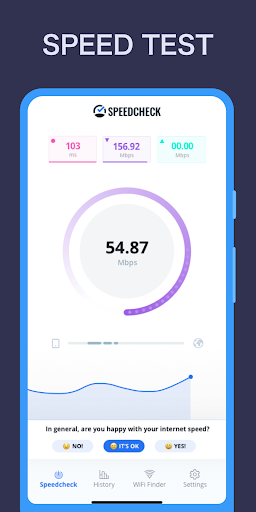

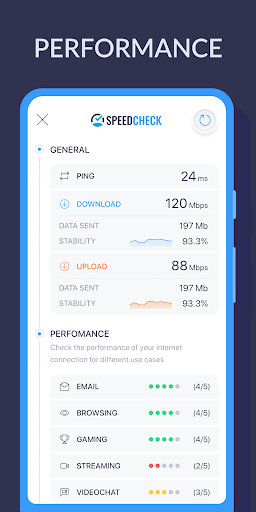

|
Developer
|
Internet Speed Test, Etrality |
|
Category
|
Tools |
|
Installs
|
270,000,000 |
|
Version
|
1.0.18 |
|
Content Rating
|
0 |
|
Price
|
Free |
Introduction to WiFi Speed Test
In today's fast-paced digital world, having a reliable and speedy internet connection is crucial. Whether you're streaming your favorite shows, attending virtual meetings, or gaming online, slow internet can be a major frustration. This is where the WiFi Speed Test app comes into play. Designed to help users measure and optimize their internet connection, this app has become a go-to tool for anyone looking to ensure their WiFi is performing at its best.
Key Features of WiFi Speed Test
The WiFi Speed Test app offers a range of features that make it stand out from other speed testing tools. Here are some of the key features:
- Accurate Speed Measurement: The app provides precise measurements of your download and upload speeds, as well as ping latency, giving you a comprehensive overview of your internet performance.
- User-Friendly Interface: With a clean and intuitive design, the app is easy to navigate, making it accessible for users of all tech levels.
- Real-Time Results: Get instant feedback on your internet speed, allowing you to quickly identify any issues and take corrective action.
- History Tracking: The app keeps a record of your past speed tests, enabling you to track your internet performance over time and identify patterns or recurring issues.
- Multi-Device Support: Whether you're using a smartphone, tablet, or laptop, the app works seamlessly across multiple devices, ensuring you can test your connection wherever you are.
How to Use WiFi Speed Test
Using the WiFi Speed Test app is straightforward. Here’s a quick guide to get you started:
- Download and Install: First, download the app from your device's app store and install it.
- Open the App: Launch the app and ensure your device is connected to the WiFi network you want to test.
- Run the Test: Tap the "Start Test" button to begin the speed test. The app will measure your download speed, upload speed, and ping latency.
- Review Results: Once the test is complete, you'll see a detailed report of your internet speed. You can also view past test results in the history section.
- Optimize Your Connection: Based on the results, you can take steps to improve your internet speed, such as moving closer to your router, reducing the number of connected devices, or upgrading your internet plan.
Why Choose WiFi Speed Test?
With so many speed testing apps available, you might wonder what sets WiFi Speed Test apart. Here are a few reasons why this app is a top choice:
- Reliability: The app is known for its accuracy and consistency, providing reliable results you can trust.
- Comprehensive Analysis: Beyond just speed, the app offers insights into your connection's stability and latency, giving you a fuller picture of your internet health.
- No Ads: Unlike many free apps, WiFi Speed Test is ad-free, ensuring a smooth and uninterrupted user experience.
- Regular Updates: The developers frequently update the app, adding new features and improvements to keep it at the cutting edge of speed testing technology.
Conclusion
In conclusion, the WiFi Speed Test app is an essential tool for anyone looking to monitor and optimize their internet connection. With its accurate measurements, user-friendly interface, and comprehensive features, it stands out as one of the best speed testing apps available. Whether you're a casual user or a tech enthusiast, this app will help you ensure your WiFi is always up to speed. Download WiFi Speed Test today and take control of your internet experience!


