




Unlocking the Power of Your Spectrum Services On the Go
In today's fast-paced world, managing your home internet, TV, and mobile services shouldn't require a phone call or a desktop computer. Enter the Spectrum Access app, a comprehensive mobile tool designed to put control of your Spectrum account directly in the palm of your hand. This app aims to be a one-stop portal for subscribers, streamlining everything from bill payments to troubleshooting. But does it deliver a seamless experience? Our review dives into its core features to see if it truly empowers the modern customer.
Core Features: Account Management Made Simple
The Spectrum Access app excels in its fundamental purpose: centralizing account control. Users can effortlessly view and pay their bills, monitor data usage for internet plans, and review upcoming statements. The billing interface is clear, and payments process quickly, providing immediate confirmation. Beyond finances, the app allows you to manage your home Wi-Fi network—a standout feature. You can change your network name and password, see connected devices, and even pause Wi-Fi access for specific devices, offering invaluable parental controls with just a few taps.
Troubleshooting and Support: A Mixed Bag of Convenience
Where the app truly shines—and occasionally stumbles—is in its integrated support functions. The automated troubleshooting guides are excellent for common issues like modem connectivity or service outages. The app can often run diagnostics and prompt you to restart equipment without needing to contact support. Furthermore, the ability to schedule service appointments or chat with a representative directly through the app is a major convenience. However, the experience can be inconsistent; wait times for in-app chat can vary, and some users report that complex issues still necessitate a traditional phone call, breaking the promised seamless experience.
TV & Streaming Experience: Your TV Guide, Redefined
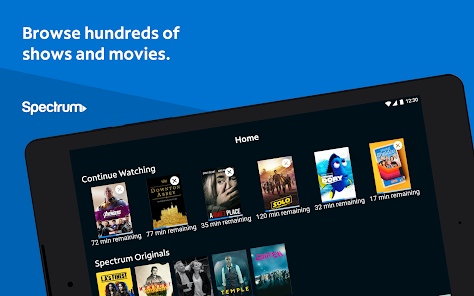
For Spectrum TV subscribers, the app transforms into a powerful companion. It acts as a full-featured remote control for your set-top box, complete with a channel guide, DVR management, and on-demand browsing. You can set recordings from anywhere, a feature that frequent travelers will love. Perhaps its best feature is the robust streaming capability. Subscribers can stream live TV and on-demand content directly to their mobile device, effectively turning any phone or tablet into a portable television. The video quality is generally strong over a stable connection, making it a solid option for catching up on shows outside the home.
User Interface and Areas for Improvement
The app’s interface is clean, logically organized, and relatively intuitive to navigate. Key functions are easily accessible from the bottom menu. However, the experience can feel slightly cluttered due to promotional messages for Spectrum mobile or upgraded services. Some users also note that the app can be slow to load account data at times, and notifications for bills or outages, while helpful, are not always perfectly reliable. An enhanced notification system and an optional "simplified" view without promotions would significantly improve the user experience.
Final Verdict: A Highly Useful, Nearly Essential Tool
The Spectrum Access app is not a flashy entertainment platform; it is a utility. And as a utility, it is largely successful. It consolidates numerous critical tasks—billing, network management, troubleshooting, and TV control—into a single, mobile-friendly package. For the average Spectrum customer, it eliminates countless minor hassles and provides genuine value through features like the Wi-Fi pauser and mobile TV streaming. While its support features could be more consistently robust and the interface a tad less promotional, its advantages far outweigh its flaws. For any Spectrum subscriber, downloading this free app is a no-brainer, transforming your smartphone into the most convenient remote control you have for your entire home network.


